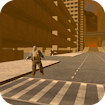
Supercars Zombie Driving
Driving · Zombie Action · 3D Car Game · by G55.CO
More adventure games
See all →




About Supercars Zombie Driving
Supercars Zombie Driving is a keyboard-controlled 3D driving game where you spawn into a zombie-overrun city and use a nearby supercar to run down hordes of the undead. You can walk around on foot, but the car is your main weapon and your best defense, so the core loop is finding a vehicle and clearing each city zone by mowing down zombies before they overwhelm you.
How to play Supercars Zombie Driving
- Load into a city zone and locate the supercar spawned near you.
- Walk up to the car and press F to get in.
- Use W, A, S, D to drive around the streets.
- Ram zombies with the car to take them out; leaving the car on foot is much riskier.
- Press C to switch camera angles if you need a better view of the street.
- Clear the zombies in the current zone to progress; press P to pause if needed.
Controls
- Desktop: W/A/S/D to drive, F to enter or exit the car, C to change camera view, P to pause.
- Mobile / tablet: On touch devices the game switches to on-screen touch controls (virtual steering/accelerate buttons) as is standard for GamePix-hosted titles; exact button layout may vary by device, and the core experience is primarily designed around the desktop keyboard scheme.
Supercars Zombie Driving tips & strategy
- Stay in the car as much as possible - you're far more vulnerable to zombies on foot.
- Keep moving rather than idling in one spot; stopped cars let zombies surround you.
- Use the camera switch (C) to get a wider view of the street before driving into a dense cluster of zombies.
- Clear zombies zone by zone instead of rushing ahead, since tighter spaces can appear in new areas.
- Watch your speed near buildings and obstacles - crashing costs you time and momentum.
What makes Supercars Zombie Driving fun
The appeal is straightforward arcade carnage: plow a supercar through waves of zombies across multiple city zones, switch camera angles for better visibility, and clear one area after another in short, replayable sessions.
Supercars Zombie Driving FAQ
Is Supercars Zombie Driving free to play?
Yes, it's free to play in the browser, no download required.
Do I need to download anything to play?
No. It runs directly in your browser via HTML5, on both desktop and mobile.
Can I play Supercars Zombie Driving on mobile?
It's playable on mobile via on-screen touch controls, though the game is primarily designed around the desktop keyboard scheme (WASD + F/C/P), so the touch experience may vary by device.
What keys do I use to control the car?
W, A, S, D drive the car, F enters or exits a vehicle, C changes the camera, and P pauses the game.
🔥 Popular games
See all →










