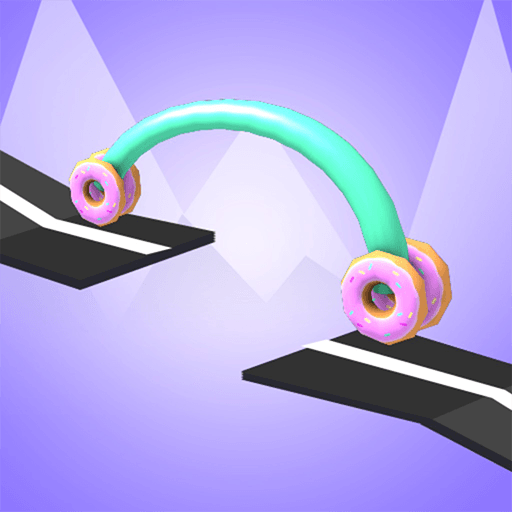
Draw Car
Puzzle · Physics · Drawing · Casual
More puzzle games
See all →


About Draw Car
Draw Car is a physics drawing game where you don't steer the car, you design it. Instead of pressing arrow keys, you draw a single line that becomes the vehicle's body, and a wheel snaps automatically onto each end of whatever shape you sketch. The moment you release, physics takes over: your creation rolls forward on its own, and its silhouette decides everything. Draw a low, flat line and the car hugs the ground to slip under overhangs; draw a tall, humped curve and it rises up to snag gems floating overhead. Each level drops a new mix of obstacles, gaps, and pickups between the starting car and the finish flag, so the same "draw and release" idea keeps demanding fresh shapes. Released around November 2020 as a free browser (HTML5/WebGL) title, it plays with the mouse on desktop or a finger on touchscreens.
How to play Draw Car
- Draw a single continuous line - this becomes your car's body, and a wheel automatically attaches at the start and end of the line.
- Release the line to let physics take over; the car rolls forward on its own toward the finish flag with no steering.
- Draw a low, flat shape to squeeze the car under low ceilings, bars, and overhangs.
- Draw a taller, humped shape to lift the car up so it collects gems positioned overhead.
- Space the two wheel points wide and keep the base level so the car stays balanced instead of tipping or stalling.
- Reach the finish line to clear the level, then adapt your shape to the next obstacle layout.
Controls
- Desktop: Click and hold the mouse button, drag to draw the line that forms your car, then release to send it rolling.
- Mobile / tablet: Touch and drag your finger to draw the car's shape, then lift your finger to make it run toward the finish.
Draw Car tips & strategy
- Wheels always attach to the two ends of your line, so where you start and stop drawing sets your wheelbase - wider is more stable, narrower is nimbler.
- Keep a flat, low body for levels with overhangs and save tall curves for levels where gems sit above the road.
- You get no steering, so scan the whole level before drawing and shape the car for the biggest obstacle, not just the first one.
- If a design flips or gets stuck, redraw with a lower center of gravity - a longer, flatter base tips over far less.
- A longer, heavier-looking body carries momentum better through dips and up ramps than a tiny compact shape.
What makes Draw Car fun
Draw-to-build mechanic where the line you sketch literally becomes the car body; automatic wheel placement at both ends of your drawing; physics-driven auto-run with no steering; obstacle-and-gem levels that reward reshaping the vehicle for each layout; instant free play in the browser on desktop and mobile via HTML5/WebGL; casual, kid-friendly design rated for ages 6+.
Draw Car gameplay video
Draw Car FAQ
Is Draw Car free to play?
Yes. It runs free in a web browser as an HTML5/WebGL game, with no download or install needed on desktop or mobile.
Do I steer or drive the car in Draw Car?
No. You never control movement directly. You only draw the car's shape, and once released it rolls forward automatically - the shape you drew decides how it handles obstacles and gems.
How do the wheels work?
Wheels attach on their own at the two ends of the line you draw, so where you start and stop the line determines the car's wheelbase.
How do I collect gems and pass low obstacles?
Draw a tall, curved body to reach gems floating overhead, and draw a low, flat body to slip under overhangs and low ceilings.
Is Draw Car the same as Draw Car Road or Draw Car 3D?
No. Several similarly named drawing-car games exist. This is the 'drawing distance' game where you shape the vehicle itself; Draw Car Road is about drawing a road or bridge, and Draw Car 3D is a separate 3D version.
Who developed Draw Car?
The original studio isn't credited on the portals that host it. It appeared around November 2020, and the sites that publish it (such as SilverGames) are distributors, not the developer.
Games like Draw Car
🔥 Popular games
See all →






