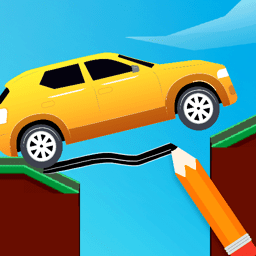
Draw Bridge
Puzzle · Physics · Drawing · Casual · by Y8 (Y8 Originals)
More puzzle games
See all →


About Draw Bridge
Draw Bridge is a browser-based physics puzzle in the popular "draw a line" genre, where a stranded car is stuck on one side of a gap and it is your job to get it moving again. Instead of steering the vehicle directly, you sketch bridges, ramps and roads with your cursor or finger; the ink you draw turns into solid material that obeys gravity, so a poorly supported span will sag, snap or send the car tumbling. Each level rearranges the puzzle with wider chasms, drops, hazards and awkward ledges, pushing you to think about where to place supports and how much material to spend. Published by Y8 as a Y8 Originals title in 2025, it runs on WebGL and works on both desktop and mobile with no download. Its short, restartable stages make it easy to experiment until your drawing carries the car safely to the finish flag.
How to play Draw Bridge
- Read the level first: note where the car starts, where the finish point is, and what gaps or hazards sit between them.
- Press and hold, then drag to draw a line — the stroke becomes a solid physical object as soon as you release.
- Bridge the gap by drawing a path from the car's ledge to the far side so the vehicle can roll or fall across.
- Watch your structure react to gravity and the car's weight; if it sags or breaks, add supports or redraw it.
- Get the car to the finish point to clear the level, then move on to the next, harder layout.
Controls
- Desktop: Click and hold the left mouse button, then drag to draw bridges, ramps and roads; release to set the line in place. A fullscreen button gives a larger view.
- Mobile / tablet: Touch and drag your finger on the screen to draw the bridge or path, then lift your finger to place it.
Draw Bridge tips & strategy
- Draw short, well-supported spans instead of one long flat line — long unsupported drawings sag under the car's weight and collapse.
- Use gravity: a downward ramp that lets the car roll and build momentum often works better than a perfectly level bridge.
- Anchor both ends of a bridge on solid ground or ledges so the structure has something to rest against.
- Add a pillar or a triangular brace beneath the middle of a long span for extra strength.
- When a level has hazards like pits or spikes, route the car over or around them rather than straight through.
- Do not be afraid to restart — the levels are short, so trial and error is the fastest way to find a shape that holds.
What makes Draw Bridge fun
Draw-to-solve physics gameplay, a stranded-car rescue theme, multiple hand-crafted levels of increasing difficulty, mouse and touch controls, WebGL rendering, fullscreen mode, and Y8 account cloud save. Free to play in the browser on desktop and mobile with no download required.
Draw Bridge gameplay video
Draw Bridge FAQ
Who made Draw Bridge?
It is published by Y8 as a "Y8 Originals" title and was released in 2025. The specific underlying development studio is not separately credited on the game's page, so attribution is to Y8's own-originals label.
How do you play Draw Bridge?
You draw bridges, ramps and roads with your mouse or finger to build a path that lets a stranded car reach the finish line, working with the game's gravity and physics rather than steering the car directly.
Is Draw Bridge free to play?
Yes. It runs free in a web browser on both desktop and mobile, with no download or installation required.
Does Draw Bridge have levels?
Yes, it is level-based. Each level adds new gaps, hazards and layouts that get progressively harder. The total number of levels is not officially published.
Can I play Draw Bridge on my phone?
Yes. The game is touch-compatible and works in mobile browsers as well as on desktop computers.
Is this the same as the old drawbridge Flash game?
No. Several different games share the name "Draw Bridge" or "Drawbridge". This one is Y8's 2025 draw-a-path car-rescue puzzle, not the classic Flash-era drawbridge-operating physics game.
Games like Draw Bridge
🔥 Popular games
See all →






