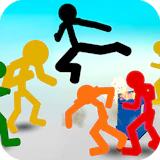
Stickman Street Fighting 3D
Fighting · Beat-em-up · Action · Stickman
More action games
See all →




About Stickman Street Fighting 3D
Stickman Street Fighting 3D drops you into a lawless city where rival gangs of stickmen have taken over the streets. Pick a fighter and wade into wave after wave of red-suited enemies, using punches and kicks to clear each block before pushing forward. The streets are littered with destructible crates and barrels that hide guns, axes, swords, and health pickups, so smashing your way through the environment is as important as smashing opponents. Your health shows in one corner of the screen and the enemy's in the other, giving you a quick read on how a fight is going. As you clear levels, more playable stickmen unlock and the waves of enemies grow tougher and more numerous. Built in Unity WebGL, it runs straight in the browser on both desktop and mobile with no install needed, making it a quick pick-up-and-brawl session whenever you want a fight.
How to play Stickman Street Fighting 3D
- Pick your stickman fighter from the characters available at the start; more unlock as you clear levels.
- Walk into the street and face the wave of enemy stickmen blocking your path.
- Punch and kick opponents, mixing up attacks to break through their defense and knock them down.
- Smash crates and barrels scattered around the level — they often hide guns, axes, swords, or health pickups.
- Grab weapons to hit harder until they break, then fall back on your fists and feet.
- Defeat every enemy on screen to clear the level and move on to the next, tougher wave.
Controls
- Desktop: Arrow keys to move, Z to punch, X to kick, C to block, and Spacebar to jump. Walk over weapon pickups or broken crates to arm yourself automatically.
- Mobile / tablet: On-screen touch controls handle movement along with dedicated punch, kick, and block buttons, so the whole game is playable with taps and swipes — no keyboard needed.
Stickman Street Fighting 3D tips & strategy
- Keep moving instead of standing still — getting surrounded by several stickmen at once drains your health fast.
- Break every crate and barrel you pass; they frequently hide better weapons or health pickups than what you're currently carrying.
- Save stronger weapons like guns for the bigger waves later in a level rather than burning them on the first couple of enemies.
- Mix punches and kicks instead of spamming one button — alternating attacks tends to stagger opponents more effectively in brawlers like this.
- Watch both health bars in the corners of the screen so you know when to retreat, grab a pickup, or push the fight.
- Try out different unlockable stickmen as they open up — later characters often handle differently, so one may suit your playstyle better than another.
What makes Stickman Street Fighting 3D fun
Wave-based 3D stickman brawling through city streets, a smash-and-loot weapon system (guns, axes, swords) hidden in destructible crates and barrels, multiple unlockable playable stickmen, and a long run of increasingly difficult levels — all free to play instantly in the browser on desktop or mobile.
Stickman Street Fighting 3D FAQ
Is Stickman Street Fighting 3D free to play?
Yes. It's a free browser game — just open the page and start fighting, no purchase or account required.
How do I play Stickman Street Fighting 3D?
Move your stickman with the arrow keys, punch and kick the enemy stickmen blocking your path, and smash crates for weapons and health as you clear each wave before advancing to the next level.
Do I need to download anything to play?
No. The game runs in your browser using Unity WebGL, so there's nothing to install — it loads and plays directly on the page.
Can I play Stickman Street Fighting 3D on mobile?
Yes, it works in mobile browsers with on-screen touch controls for movement, punching, kicking, and blocking.
What weapons can I find in the game?
Destructible crates and barrels scattered through each level hide weapons like guns, axes, and swords, plus health pickups, giving you an edge over the waves of stickman enemies.
🔥 Popular games
See all →






