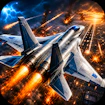
Combat Landing
Airplane · Action · Shooter · War
More action games
See all →






About Combat Landing
Combat Landing is a free browser-based flight combat game where the mission isn't finished until your plane is back on the ground. Across four levels with different scenarios, you take off to intercept enemy fighter jets and drones, strike ground targets, and dodge incoming missiles and gunfire — then bank back toward base to land safely and lock in your score. Landing cleanly matters as much as shooting straight: a run only pays off once your aircraft is down in one piece on the runway. Along the way you earn flight miles that can be spent on upgrades, giving you a reason to keep coming back. Built with HTML5, it loads instantly in any modern browser on desktop, tablet, or phone with no download or install required. If you enjoy arcade dogfighting with a bit of risk-management under pressure, Combat Landing is a quick, replayable session.
How to play Combat Landing
- Launch the game in your browser — no download needed, jump straight into the first mission.
- Take off and steer your aircraft through the mission airspace, watching for enemy jets, drones, and ground targets.
- Fire on enemies to clear them before they hit you; ground targets disappear after about 10 seconds, so prioritize them quickly.
- Dodge incoming missiles and gunfire while you fight — missing a shot won't end the mission, so keep engaging rather than playing overly cautious.
- Once the airspace is handled, turn back and head toward base.
- Line up your approach and land safely on the runway to bank your score and earned flight miles.
Controls
- Desktop: Arrow keys to steer your plane, Space bar to fire, and P to pause the game.
- Mobile / tablet: Drag anywhere on screen to steer; release to let the plane gently re-center itself.
Combat Landing tips & strategy
- Hit ground targets first — they only stay on screen for about 10 seconds, so hesitating costs you the points.
- Don't play too cautiously: missing shots doesn't fail the mission, so keep firing instead of holding back.
- Keep some altitude and speed margin before committing to your landing approach — coming in too hot on the runway is an easy way to lose a run late.
- Spend earned flight miles on upgrades between runs rather than hoarding them; a stronger loadout makes later levels much more manageable.
- Watch your aircraft's condition throughout the mission, not just at the end — back off aggressive dogfighting early if you're already taking heavy damage.
- Learn each level's layout before chasing a high score; the four scenarios differ enough that a route that works on one can leave you exposed on another.
What makes Combat Landing fun
Four mission-based levels blending aerial dogfighting with ground-target strikes, a flight-miles currency for unlocking upgrades, and a landing-to-score mechanic that makes a safe return to base as important as the combat itself.
Combat Landing FAQ
Is Combat Landing free to play?
Yes. It's a free browser game — just open it and start flying, no purchase or subscription needed.
How do you play Combat Landing?
Fly through each mission destroying enemy aircraft, drones, and ground targets while dodging incoming fire, then head back to base and land on the runway to complete the mission and bank your score.
Do I need to download Combat Landing?
No. It's built in HTML5 and runs directly in your browser, so there's nothing to install on desktop or mobile.
Can I play Combat Landing on my phone?
Yes. It supports touch controls — drag to steer, release to re-center — and works in both landscape and portrait orientation.
What happens if I don't land safely at the end of a mission?
Landing is part of scoring in Combat Landing, so a mission only fully pays off once your aircraft is down safely on the runway — strong combat followed by a crashed approach costs you the reward.
🔥 Popular games
See all →










